
The Mindbreeze InSpire 20.4 release – What’s new?
We are pleased to announce a number of new features now available in our Mindbreeze InSpire 20.4 release. Special thanks to all our customers and partners, who challenge us each day anew and inspire our constant efforts towards further advancement.
The update from Mindbreeze InSpire 20.3 to 20.4 has once again yielded several new features. We’d like to highlight three of these features in greater detail here:
Defining dynamic metadata for each document
Metadata can now be dynamically defined per document as a filter for indexing or in the semantic pipeline. If an additional data source is added to an existing index, all filterable properties of the new documents are immediately available.
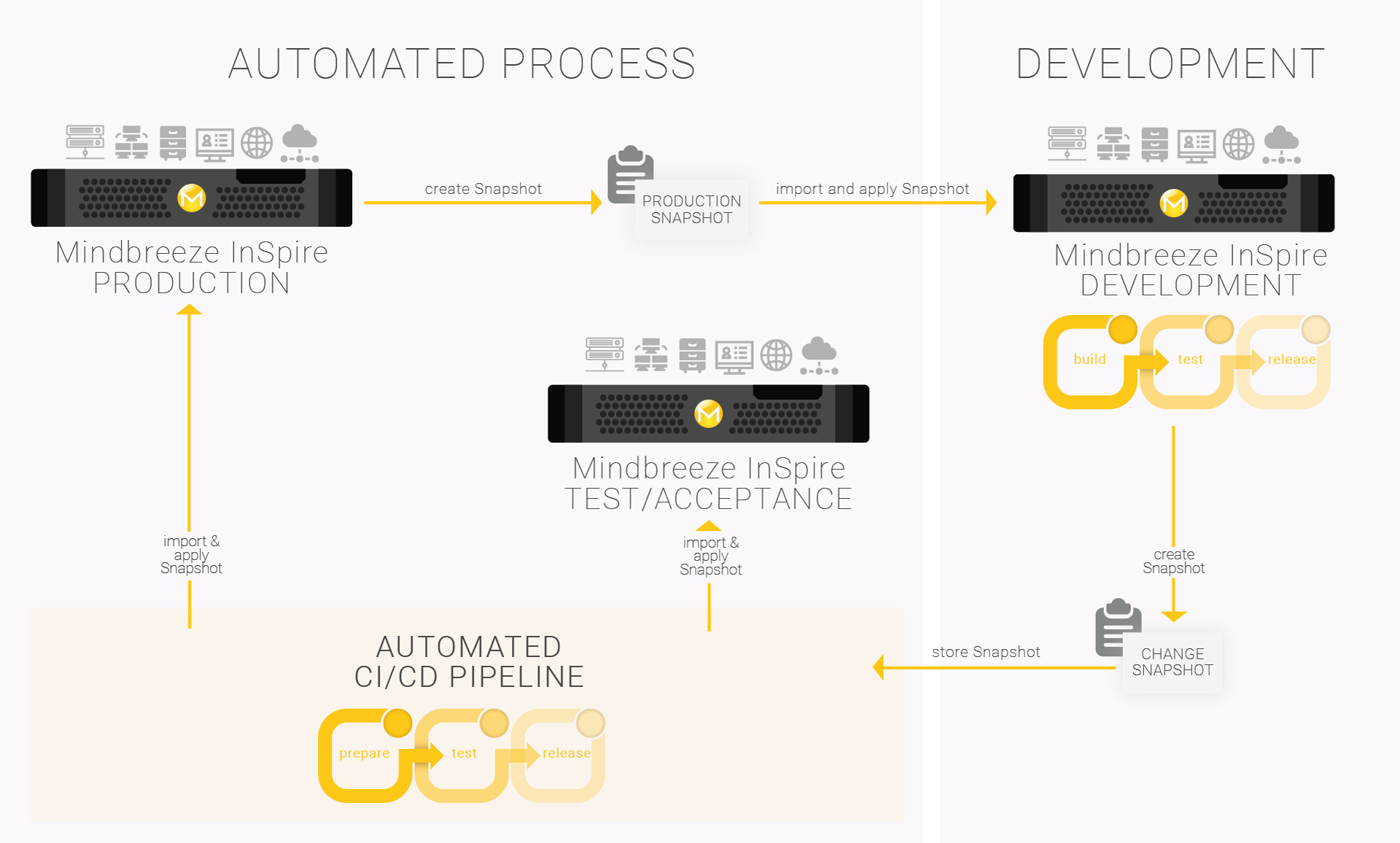
Changes in CI/CD pipelines are automatically incorporated
With the help of a Mindbreeze InSpire snapshot, you can make changes to your appliance without having to make them directly on the live system.
This primarily concerns changes:
- to the Mindbreeze Service configuration (adding/removing and customizing connectors, indices, filters, client services, and so on),
- to the semantic pipeline,
- to the query transformation pipeline,
- to InSpire search apps, and
- to any type of resource files such as boosts, relevance parameters
Would you like to take full advantage of this feature for your Mindbreeze InSpire configuration? Contact our experts for more information.
Connector extensions
Our connectors have also been upgraded as part of the Mindbreeze InSpire 20.4 release.
- Microsoft SharePoint Online: enhanced support for user-based authentication
- Atlassian Confluence: support for custom properties
- Support for Atlassian Confluence 7.4 (long-term support)
In addition, we’ve implemented numerous technical enhancements and made a number of security-relevant adaptations.
Would you like to learn more about our new features? Have a look at our Release Notes and sign up for our webinar Mindbreeze InSpire 20.4 Release – What’s New?.
Latest Blogs

How MCP Connects AI to Your Business Information
The Model Context Protocol, commonly called MCP, provides a standard way for AI applications to connect with external information and tools. It gives assistants and agents a consistent way to request help from systems outside the AI model.

How an AI Agent Uses MCP to Complete a Business Task
A customer reports that a production system has failed for the third time in two months. A service employee needs to review the customer’s coverage, understand the earlier incidents, find current technical guidance, and decide whether the issue should be escalated.